Home /
Put your side project on the map for free
Choose a graphical places guide, a website locator or a styled data map, with checked examples, background services and publishing routes.
- uMap supplies a graphical editor and hosted sharing.
- Leaflet and MapLibre need background sources and a hosted page.
- The examples use three published venue points, with service conditions checked on 20 October 2026.
A local guide, a map of stockists, a collection of walks or a small data explorer can all start with the same thing: places you want someone else to see. Free tools can give those places a map, with popups, layers and a page you can share.
Choose the route by how you want to make and maintain it:
| What you want to make | Start with | What you control |
|---|---|---|
| A places collection you can edit in the browser | uMap, on a public community host | Places, descriptions, layers and sharing settings through a graphical editor |
| A locator inside your own website | Leaflet + a suitable tile service | The page, markers, popups and interactions in code |
| A styled map with your own data layers | MapLibre GL JS + OpenFreeMap | The map style, data-driven colours and layer behaviour in code |
The examples below use the same three London places: the British Museum, British Library and Wellcome Collection. They are approximate venue points for demonstration, rather than entrances or a suggested itinerary. Documentation, provider conditions and representative browser workflows were checked on 20 October 2026; the code examples ran locally, without a public deployment.
Your places and the background are different ingredients
The streets, parks and labels behind your markers are the basemap. Your own information is a separate layer: names, coordinates, descriptions, categories, lines or boundaries. A library draws those things; an editor gives you controls for changing them. Something must also host the result.
uMap bundles much of that work into a hosted editor. Leaflet and MapLibre GL JS are libraries you put in a web page, so you choose the background service and host the page yourself.
Keep the information you care about in a file of its own. A small places list can begin as CSV:
name,latitude,longitude
British Museum,51.519444,-0.126944
British Library,51.529439,-0.126939
Wellcome Collection,51.525944,-0.133889
These coordinates come from the venues' published Wikidata records: British Museum, British Library and Wellcome Collection. Wikidata's structured data is CC0. The background map has its own credits.
GeoJSON is a useful next format when the information includes points, lines or polygons and their properties. Its coordinates use longitude, latitude order. Direct Leaflet marker calls use the opposite order, so copying a coordinate pair between examples deserves a check.
A places guide you can edit in the browser
uMap on OpenStreetMap France is the easiest entry here if you want to spend your time choosing places and writing descriptions. It gives you a map editor, data layers, markers, popups and sharing controls. A neighbourhood guide, public-art collection or list of useful repair shops fits that shape well.
You can draw points directly, or import an existing file. In the checked example, importing the three-place GeoJSON produced a layer that could be browsed and edited, with names and descriptions available for popups.
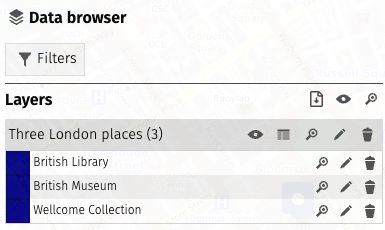
Map credit: © OpenStreetMap contributors, ODbL.
A useful first map needs only a few steps: create a map, import or add your places, give the layer a name, check a popup, then save. Use separate layers when visitors should be able to distinguish groups such as places to eat and places to visit. uMap also supports CSV and several geographic import formats.
An address column does not automatically become a point. Start with latitude and longitude, place markers yourself, or use a separately checked geocoding step. The official spreadsheet tutorial explains that separation; its complete version is currently in French.
On this host, an anonymous map could be saved as Draft (private) without an account. Returning to edit an anonymous map depends on its secret edit link, so keep that link somewhere safe. The anonymous viewing choices inspected were private draft or public; the broader software documentation should not be read as a promise of unlisted anonymous sharing on every host.
For publication, check who can view the map and who can edit it separately. The publishing guide explains public sharing and iframe embedding: uMap hosts the map, while your website can contain the embed. Keep an export as well as the edit link. A full uMap backup preserves more of the project than a plain GeoJSON export of its features.
This is a community-hosted route, with host-specific rules. Check the background you choose too: OSM France’s tile-service conditions require public, nonprofit use and moderate traffic, with limited tolerance for low-volume company sites. Those are background-service conditions, rather than a complete uMap hosting contract. “Free uMap” is not a promise of unlimited storage, permanent hosting or identical settings across instances.
A locator inside your own website
Leaflet is a good fit when the map is one part of a page you already control. A shop locator might have a search box above it and a text list below it. A project page might need three markers and a short explanation, with no separate map-editing interface.
The complete pairing checked here was Leaflet 1.9.4 plus OSMF's Standard raster tile service. Leaflet draws the markers and popups; the service supplies ready-rendered background tiles. The example reads the same GeoJSON collection and lets a visitor select a marker or a place in the list.
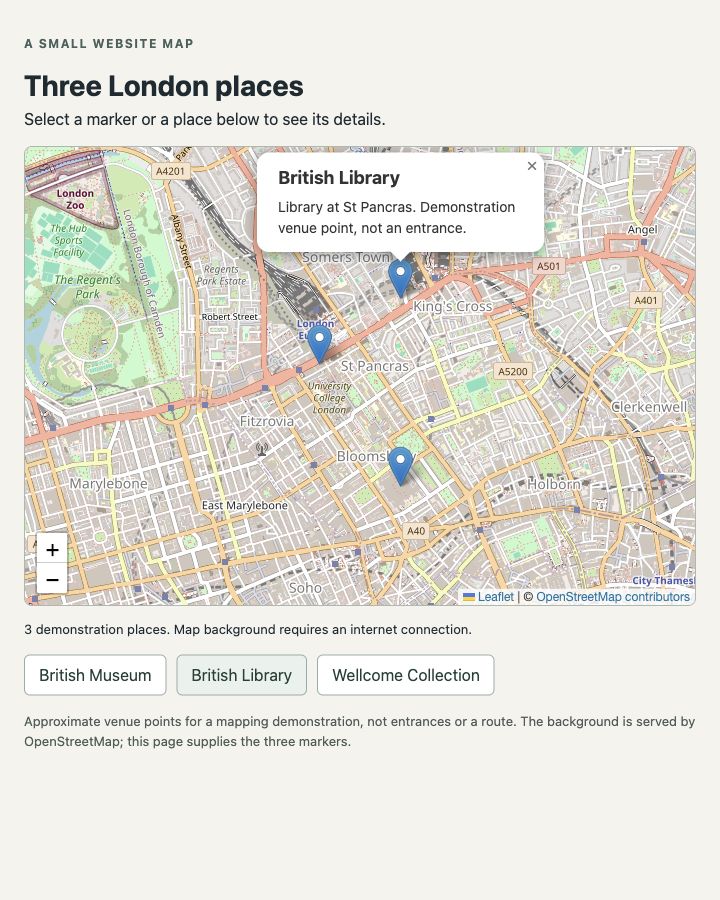
Map credit: © OpenStreetMap contributors, ODbL.
The official quick start supplies the page structure: include Leaflet's CSS and JavaScript, give the map container a height, choose the tile layer and add your information. Its GeoJSON guide covers adding feature properties and popups. Lines and polygons can represent a trail or an area as well as individual places.
For this route, publish the HTML, styling, JavaScript and data together on your static website. Serve the files over HTTP while developing, too: opening an HTML file directly is a poor check for a page that fetches a separate data file. Changing your places means editing the data or building your own editing workflow; Leaflet is not the graphical editor uMap provides.
The background choice matters. OSMF's tile-use policy permits ordinary interactive viewing subject to visible attribution, normal browser identification and referrers, and proper caching. Keep the browser defaults; do not suppress referrers, bypass caching, bulk-download tiles or add offline saving. The service is best effort and can block access. It is a reasonable starting point for this modest example, rather than a hosting guarantee for every website.
Keep a persistent link to © OpenStreetMap contributors and the data licence. If the project needs different traffic allowances or support, choose a background provider that offers them and update its URL and credits together.
A styled map with your own data layers
MapLibre GL JS with OpenFreeMap gives you another complete route when the map's appearance and data styling are part of the project. Vector tiles let the browser draw the background from geographic features and style rules, rather than displaying only finished tile images.
In the checked example, MapLibre GL JS 6.15.0 loads OpenFreeMap's Liberty style, then adds the three places as a separate GeoJSON source and circle layer. A category property chooses each point's colour. A small filter changes which features are shown.
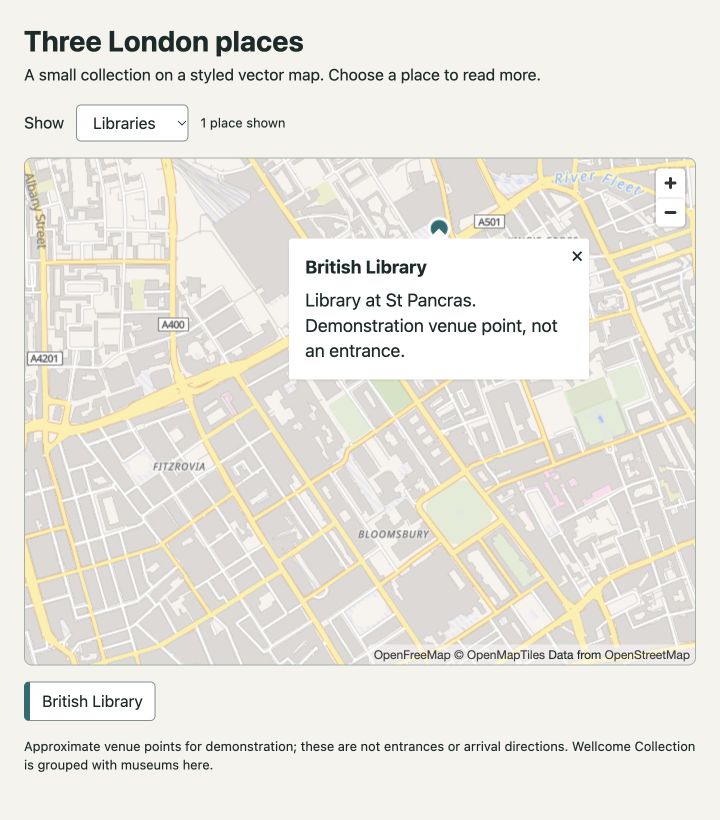
Background credits: OpenFreeMap, © OpenMapTiles, data from OpenStreetMap.
Selecting Libraries leaves the British Library visible. Selecting Museums shows two points; Wellcome Collection, which also has a library, is grouped with museums for this demonstration. The useful capability is that a property in your information can drive both the drawing and the controls around it.
The official GeoJSON point example and layer-filter example explain those building blocks. You can apply the same source/layer approach to geographic lines and polygons. Three points establish that the small example works, not how a large dataset will perform.
OpenFreeMap currently offers its public background service without registration or an API key, including commercial use, and advertises no cap on ordinary map views or requests. It has no SLA, and its terms distinguish normal viewing from automated collection and offline downloads. Preserve the supplied OpenMapTiles and OpenStreetMap attribution.
Use the current MapLibre installation guide when building the page. Version 6 uses ES modules and workers, and 6.15.0 requires working WebGL2. An older global-script snippet may not match it. Some official examples also use a different, keyed background provider: copying that style URL changes the service you are using.
As with Leaflet, you host your page and your own data files. OpenFreeMap supplies the background, not storage for your places or a graphical editing interface.
Put the code versions online
If you do not already have a website, GitHub Pages can host these static pages from a public repository on GitHub Free. You need a GitHub account; your page and published data will be public. The supplied github.io address avoids needing to buy a domain.
Put index.html, the CSS, JavaScript and GeoJSON together in the repository, keeping their relative paths. In Settings → Pages, choose “Deploy from a branch”, then select the branch and root folder containing the page. GitHub’s creation guide covers the full publishing flow.
This hosting route was checked in documentation, not deployed for these examples. Pages has usage limits, including a 1 GB published-site limit, and is not offered to run an online business, e-commerce site or commercial SaaS. A public project guide fits a different job from a transactional business site. Your existing business host may be the appropriate place for its locator.
Give the map a useful subject
A basemap does not automatically provide address search, directions or live information. Those are separate services. The free-APIs guide covers postcode coordinates, route calculation, river readings, earthquakes and other possible subjects for a map. Keep their dates, units, licences and service conditions with the displayed information.
If the project later needs a backend, the Free Compute guide covers VMs, functions and databases. Serving your page is a different job from serving the world’s background tiles. If owning a regional basemap becomes useful later, PMTiles offers a read-only tiled archive accessed through HTTP Range requests. Its storage and request costs remain separate. It is an onward option, not a prerequisite for putting a few places on the web.
Start with a collection small enough to check point by point. Give each place a useful name and description, keep the source file and credits, and choose the route that lets you maintain it: the browser editor for ongoing graphical changes, your website code for a locator, or styled layers when the information should change how the map looks.